
Recently, I started using AI coding agents for most of my day to day work. Claude Code for planning and building, Codex for reviews and second opinions, and sometimes even vice versa. Very soon I had five or six of them running in different terminal tabs.
And it became a mess. I didn't know which agent was done, which one was stuck on a permission prompt and which one was waiting for me. I was the one switching tabs and copy pasting results between agents.
So I thought, why can’t one agent do this for me? One agent that splits the work, hands it out to other agents, waits for them and puts the results together. Just like a tech lead and the team.
That’s where Herdr came in.
What is Herdr?
Herdr is a terminal workspace manager for AI coding agents. Think of it like tmux, but it understands the agents running inside it.
It organises your terminals in three levels:
- Workspace: One per project or repo. Like a separate desktop for that project.
- Tab: A view inside a workspace. I use one tab per feature, for example one lead and its team.
- Pane: One terminal inside a tab, split side by side or one below the other. Each pane runs a shell or an agent.
On top of that,
- It detects the agent running in a pane (Claude Code, Codex, OpenCode and more).
- It knows the agent’s state:
idle,working,blocked(waiting on a permission prompt) ordone. - It has a CLI, so an agent can control other panes and agents. This is the important part.
Every pane gets an ID like w2:p1 (workspace 2, pane 1). So an agent that can run shell commands can now start other agents, give them work and read their answers.
herdr agent start reviewer --kind codex --pane w2:p3
herdr agent prompt reviewer "Review the current diff"
herdr agent read reviewer --lines 150
The Idea: A Lead and Its Subagents
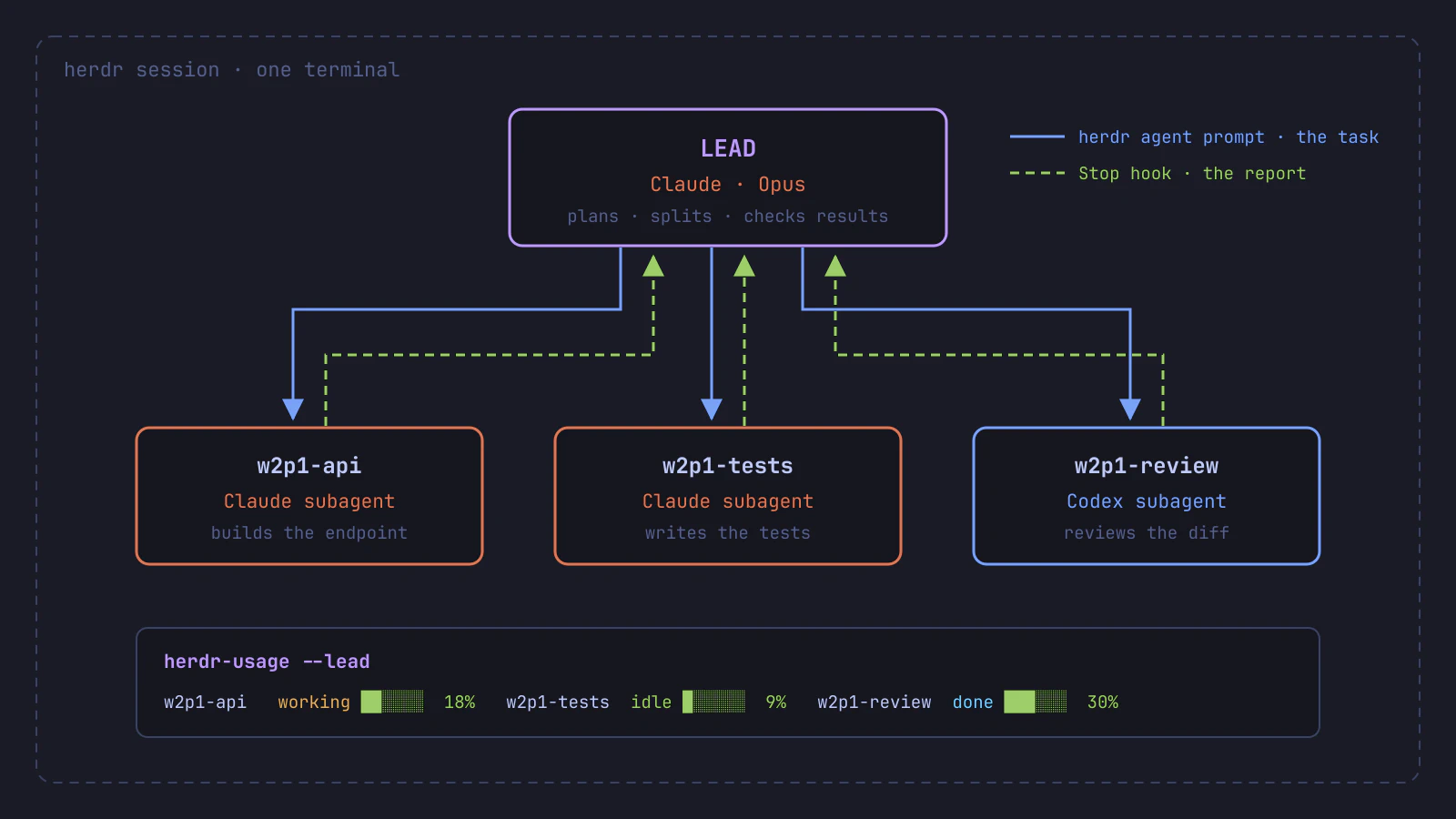
- Lead: A Claude Code session (Opus). It plans, splits the work, starts the subagents and checks the combined changes.
- Subagents: Separate Claude Code or Codex sessions, each in its own pane with one piece of the work. They share the same checkout, so I give each one different files.
Why mix Claude and GPT models (through Claude Code and Codex)? They are trained differently, so they often make different mistakes. Codex gives me a second opinion on Claude’s changes, and I still check its findings myself.
Real-Time analogy
Think of it as a small team in an office. The tech lead breaks the feature into tasks for two developers. When they are done, a reviewer from another team checks the work with fresh eyes.A simplified illustration of my layout: the lead on the left, subagents on the right, a team dashboard at the bottom.
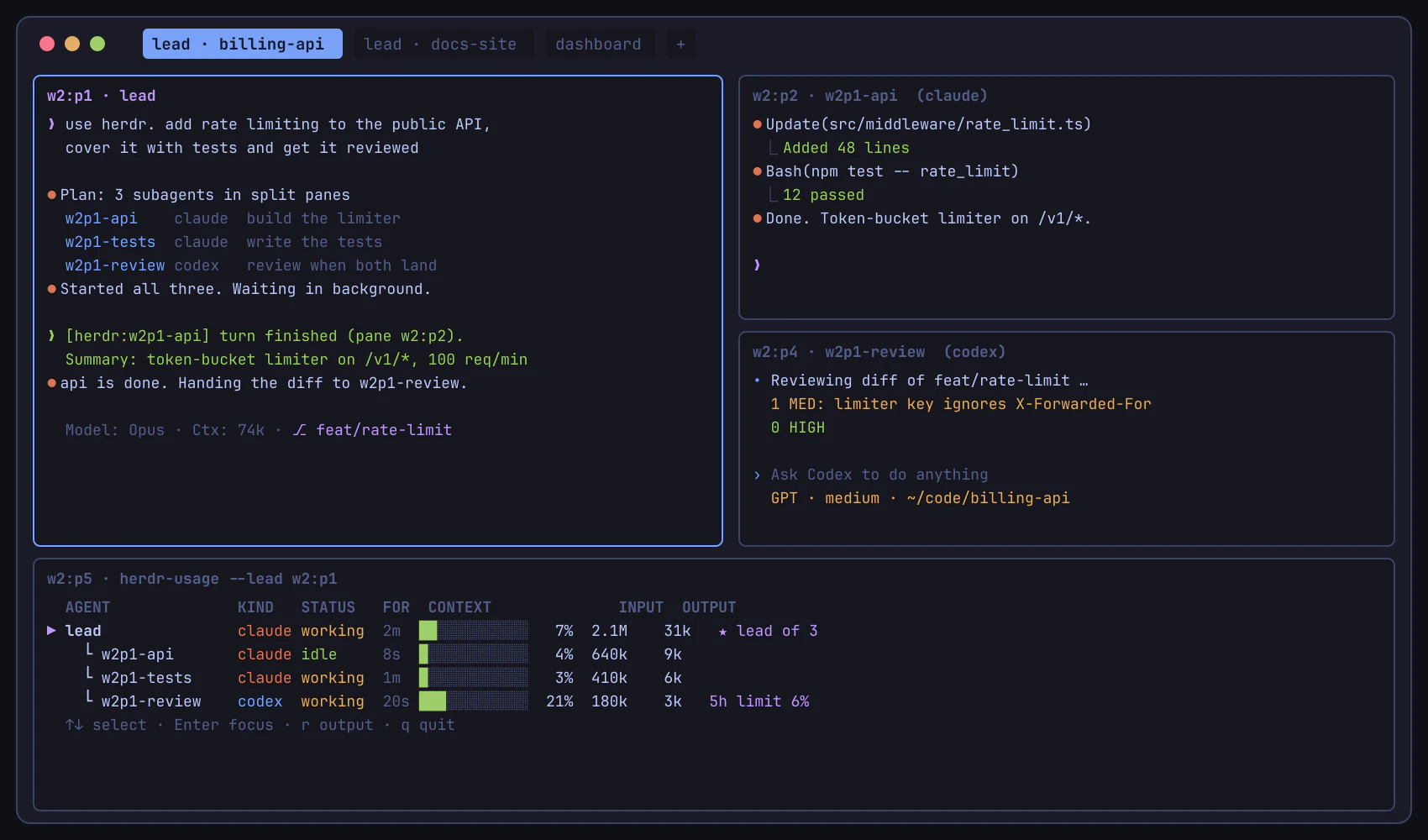
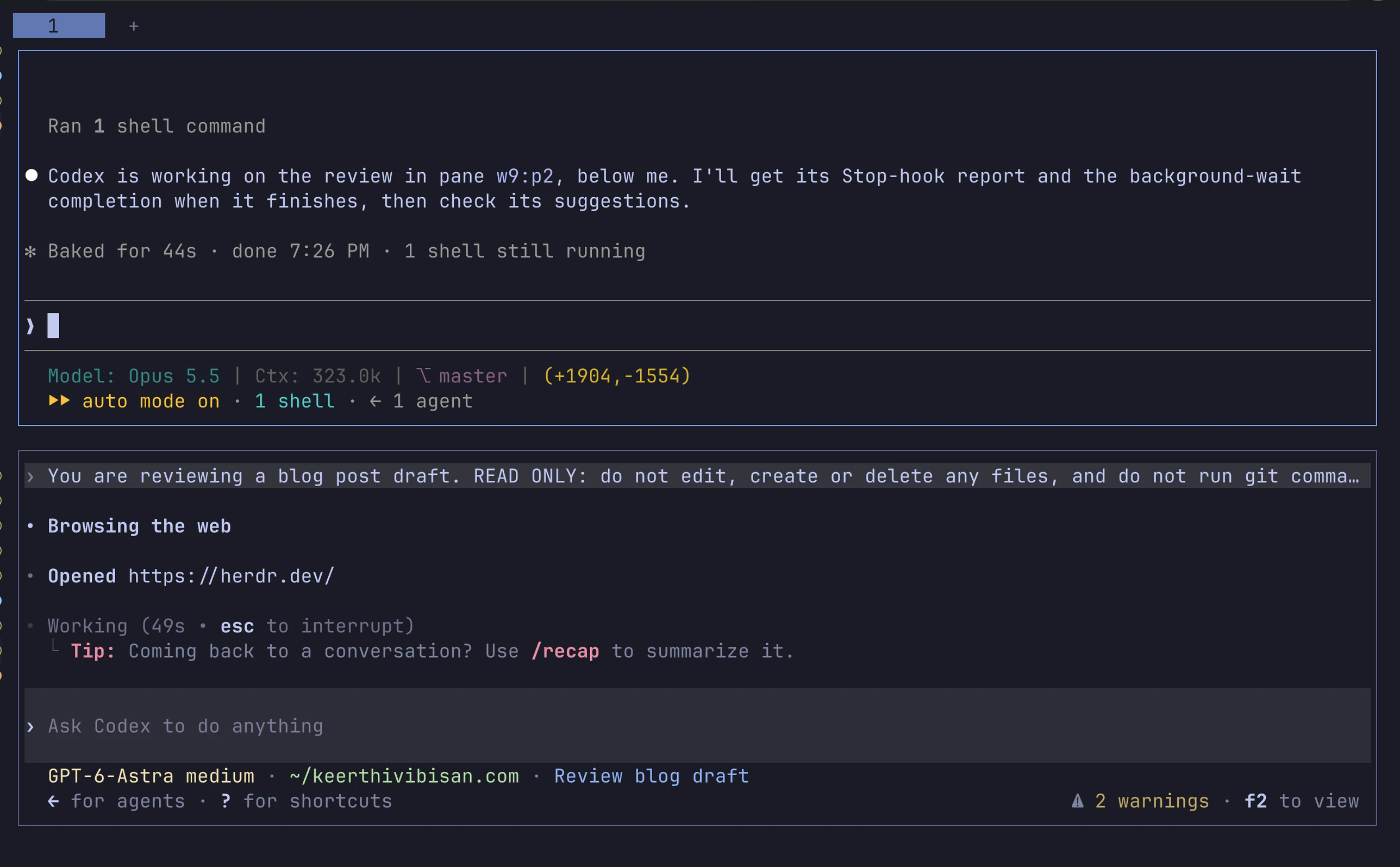
And a real one. While writing this blog, my Claude lead (top) asked a Codex subagent (bottom) to review this very post:
The Problem: “I’m Done” Never Reached the Lead
The first version had one big problem. Subagents finished their work, but the lead didn't know.
Herdr is pull based. When a subagent finishes, nothing is sent to the lead. The lead only finds out if it is waiting on it. In my setup, the lead either sent the task and moved on, or waited in the foreground and the Bash tool timed out.
So I fixed it with two signals.
Signal 1: Wait in the Background
Claude Code can run a Bash command in the background and wakes the agent up when it exits. So the lead sends each task with --wait, as a background command:
herdr agent prompt w2p1-api "Add rate limiting to /v1/*" --wait --timeout 3600000
--wait first checks that the subagent started working, then waits until it is idle, done or blocked. This is the safety net: it also catches a subagent stuck on a permission dialog.
Don’t use a separate herdr agent wait right after the prompt. If the subagent hasn’t started yet, it is still idle, so the wait returns at once and looks like a finish.
Signal 2: The Subagent Reports Back (Stop Hook)
Claude Code and Codex both support a Stop hook, a script that runs every time the agent finishes a turn. My hook finds the subagent’s lead and sends it the last message as a summary using herdr agent prompt:
[herdr:w2p1-api] turn finished (pane w2:p2). Summary: token-bucket limiter on /v1/*, 100 req/min
How does the subagent know its lead? Before starting a subagent, the lead writes its own pane ID into a file named after the subagent’s pane. For example, the file ~/.cache/herdr-leads/w2:p2 contains w2:p1. The hook reads that file. Pane IDs are unique within a Herdr server, so I can run many leads at once and every report reaches the right one.
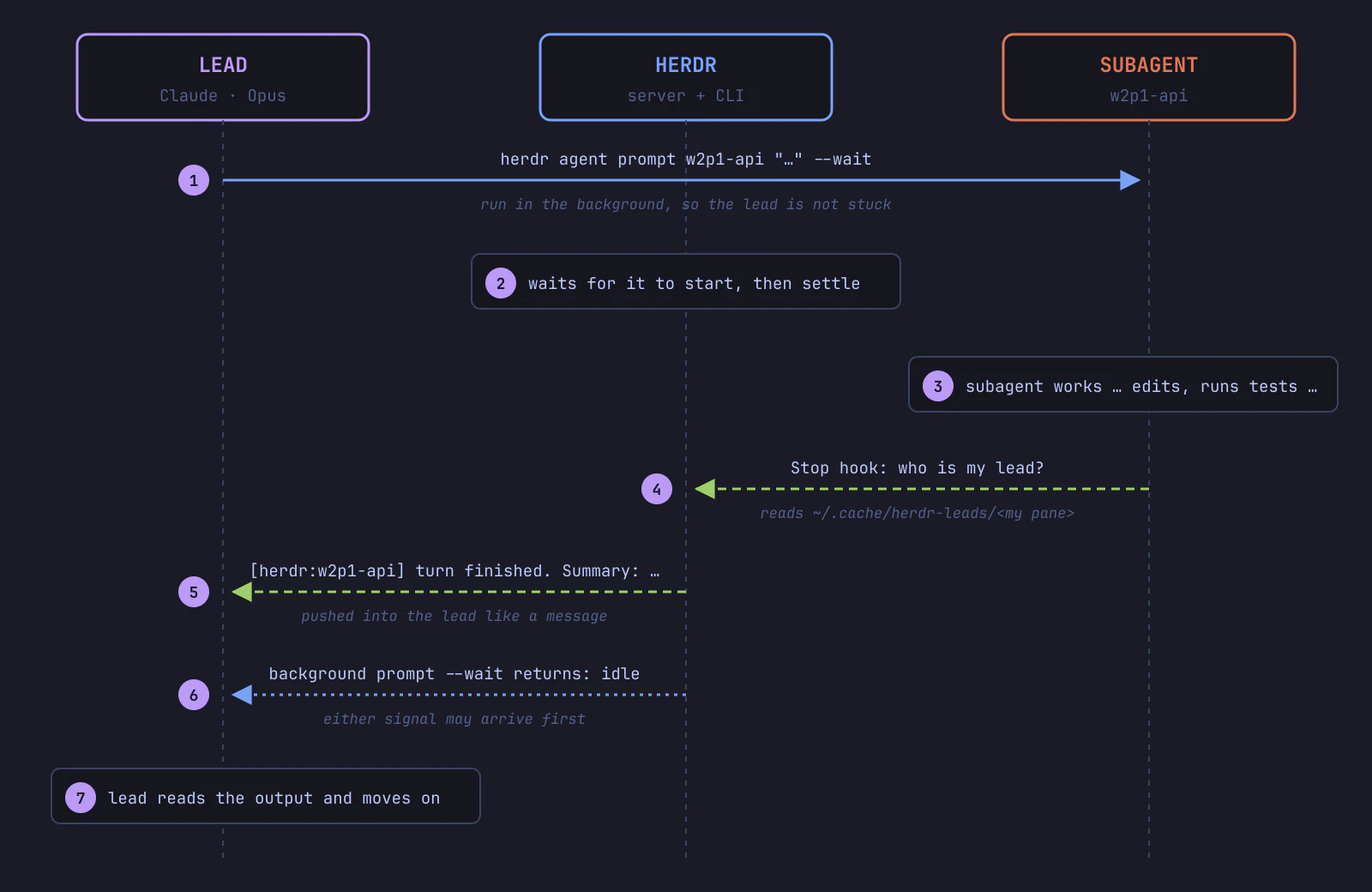
The report is best effort (12 tries, 10 seconds apart), and it may contain a question instead of a result. An agent stuck on a dialog sends no report at all, which is why the background wait is still needed.
Things That Broke
- Codex hooks never fired. In my setup, Codex ran hooks in a shared daemon that couldn’t see the pane. Starting it with
--no-daemonfixed it. - New panes were “busy”. A new pane’s shell takes a moment to start, so
agent startfailed withagent_pane_busy. A short retry fixed it. - False finishes. A separate
agent waitreturned before the subagent even started.prompt --waitfixed it (see Signal 1).
Watching the Team: herdr-usage
I also wrote a small dashboard script, herdr-usage (bash and jq). It is my own optional script, not part of Herdr. It reads Herdr, the Claude Code and Codex session logs, and git, and never touches project files.
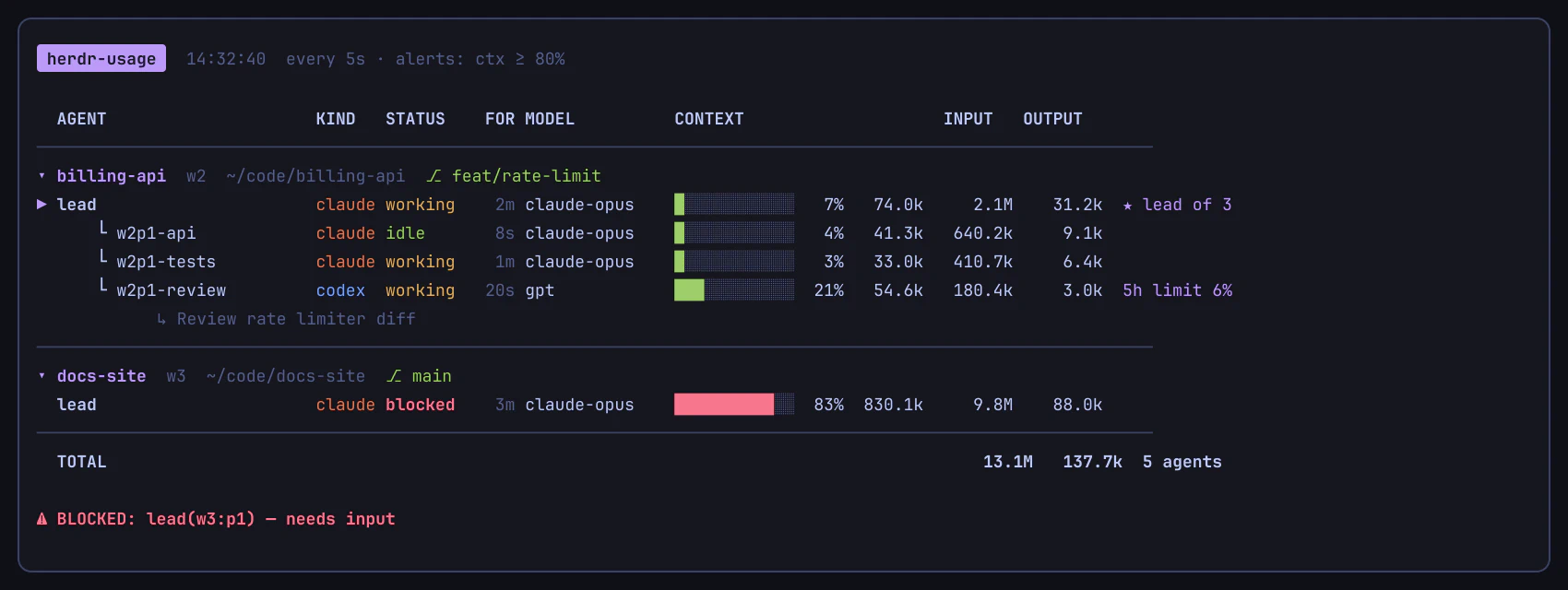
- Agents grouped by workspace with the git branch, subagents under their lead.
- Context bar estimates how full each agent’s context is, with a notification at 80% so I can
/compactin time. - FOR shows how long an agent has been in its state. idle 14m usually means it is waiting for me.
↑↓selects an agent,Enterjumps to its pane,rshows its last output.
Step-by-Step Setup
Agents that start other agents can spend tokens fast. Start small and keep it to two or three subagents.
You need: macOS or Linux, working Claude Code and Codex logins, bash and jq. I tested this with Herdr 0.9.5, Claude Code 2.1 and Codex 0.169.
Step 1 – Install Herdr and Connect the Agents
curl -fsSL https://herdr.dev/install.sh | sh
herdr integration install claude
herdr integration install codex
herdr          # open Herdr
Step 2 – Give the Lead the Herdr Skill
Herdr ships an official skill that teaches Claude to use the herdr CLI (SKILL.md on GitHub). The binary prints the same file for its version:
mkdir -p ~/.claude/skills/herdr
herdr --skill > ~/.claude/skills/herdr/SKILL.md
The official skill covers the commands, not a lead and subagents setup. So at the end of that file I added my own short lead protocol, so the lead follows the same steps every time:
1. Name subagents after your pane (w2:p1 → w2p1-api).
2. Before starting one, write your pane ID to ~/.cache/herdr-leads/<its pane ID>.
3. Start Codex with -- --no-daemon. Retry agent start on agent_pane_busy.
4. Send each task as a background `herdr agent prompt <name> "<task>" --wait`.
5. On a "[herdr:<name>] turn finished" report or a finished prompt, read the output.
6. If a subagent is blocked, ask me first. When done, summarise, close your panes
   and delete their registry files.
Running herdr --skill > again after an update replaces the file, including your protocol. Keep a copy.
Step 3 – Add the Stop Hook
Save this as ~/.claude/hooks/herdr-subagent-report.sh (create the hooks folder first if it doesn’t exist):
herdr-subagent-report.sh
#!/usr/bin/env bash
# Stop hook: when a herdr subagent finishes a turn, push a short report to its lead.
[ "${HERDR_ENV:-}" = 1 ] || exit 0
[ "${HERDR_REPORT:-1}" != 0 ] || exit 0
[ -n "${HERDR_PANE_ID:-}" ] || exit 0
command -v herdr >/dev/null && command -v jq >/dev/null || exit 0

# Who is my lead? The lead wrote its pane ID here when it started me.
REG="$HOME/.cache/herdr-leads/$HERDR_PANE_ID"
LEAD=""
[ -f "$REG" ] && LEAD=$(head -n1 "$REG" | tr -d '[:space:]')
LEAD="${LEAD:-${HERDR_LEAD:-}}"
[ -n "$LEAD" ] && [ "$LEAD" != "$HERDR_PANE_ID" ] || exit 0
input=$(cat)

self=$(herdr agent get "$HERDR_PANE_ID" 2>/dev/null | jq -r '.result.agent.name // .result.agent.pane_id // empty')
[ -n "$self" ] && [ "$self" != "$LEAD" ] || exit 0
herdr agent get "$LEAD" >/dev/null 2>&1 || exit 0

# Last assistant text: prefer the hook field, else read the transcript.
msg=$(jq -r '.last_assistant_message // empty' <<<"$input")
if [ -z "$msg" ]; then
  tp=$(jq -r '.transcript_path // empty' <<<"$input")
  [ -f "$tp" ] && msg=$(tail -n 200 "$tp" | jq -rs '
    [ .[] | select(.type == "assistant")
          | [.message.content[]? | select(.type == "text") | .text] | join(" ")
          | select(length > 0) ] | last // empty' 2>/dev/null)
fi
summary=$(printf '%s' "$msg" | tr '\n\r\t' '   ' | tr -s ' ' | cut -c1-400)
report="[herdr:$self] turn finished (pane $HERDR_PANE_ID). Summary: ${summary:-(no text output)} -- Full output: herdr agent read $self --source recent-unwrapped --lines 150"

# Deliver in the background; retry while the lead is busy with a dialog.
(
  for i in $(seq 1 12); do
    herdr agent prompt "$LEAD" "$report" >/dev/null 2>&1 && exit 0
    sleep 10
  done
) </dev/null >/dev/null 2>&1 &
exit 0
Register it as a Stop hook in ~/.claude/settings.json. Merge this into your existing hooks (Herdr’s integration adds its own there), don’t replace the file:
{
  "hooks": {
    "Stop": [
      { "hooks": [ { "type": "command", "command": "bash \"$HOME/.claude/hooks/herdr-subagent-report.sh\"", "timeout": 15 } ] }
    ]
  }
}
Merge the same Stop entry into ~/.codex/hooks.json for Codex. The first time, Codex asks you to review and trust the new hook.
The hook does nothing in a normal session. It only runs when the pane has a registered lead.
Step 4 – Use It
Start a fresh claude in a Herdr pane and mention Herdr in the prompt:
use herdr, spin up a claude subagent to add rate limiting to the API,
another one to write the tests and a codex subagent to review both
The lead does the rest. You can still open any pane and talk to a subagent directly.
Advantages
- No more tab hopping. I talk to the lead, the lead talks to the team.
- Work in parallel. Code and tests are written side by side, then Codex reviews the combined diff.
- Nothing is hidden. Every subagent is a real pane I can open or take over.
Conclusion
Herdr gave me the building blocks: panes, agent states and a CLI. With a Stop hook, a background wait and a small protocol, separate agents became a small team that reports back on its own.
I believe this is where agentic coding is going. Not one big agent doing everything, but a lead that plans and a few focused agents that do the work, with a human still making the decisions.